I run a lot of VMs in Parallels. (Currently I am running 7, although not all at once, of course.) I end up with a bunch of red generic Parallels VM alias icons on my desktop. Which means that the usual visual quick clues (color, logos, etc) aren’t there and I have to look at the text underneath. Sometimes I am in a rush and start Windows Server 2008 instead of Windows 7 Pro, or Ubuntu Linux instead of Debian Linux (one is set up as a desktop and one as a server with no X).
I really wanted some custom icons for those VMs. My solution, (as usual) when it doesn’t exist make it. So, I opened pvs.icns (contained in the Parallels Desktop.app bundle /Applications/Parallels Desktop.app/Contents/Resources/pvs.icns) in Icon Composer.app, selected the 512 x 512 version and copied it to the clipboard. I then pasted that into a new Photoshop document and began editing. I saved each new version as a 512 x 512 pixel png and then dropped them in img2icns.app which converted them to the icns files I needed to customize my VM launchers.
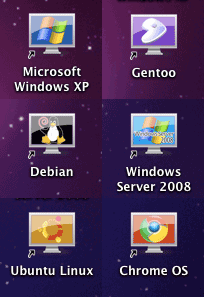 Behold the glory:
They aren’t perfect, especially the Windows Server 2008, but they are different enough that it is easy to select the right VM in a heartbeat.
You can download the icns files from http://www.evardsson.com/files/parallels_icons.zip