Apache and PHP HTTP PUT Voodoo

April 27th, 2010 by Sjan Evardsson

While trying to work out the details for a PHP REST utility I kept running into a wall when it came to using HTTP PUT (and HTTP DELETE) with Apache 2.2 and PHP 5. There are plenty of scattered tidbits of information relating to this on forums about the web, many old, and many more incomplete or even unhelpful. [As a side note: if someone on a forum you frequent is asking for help with getting HTTP PUT to work in Apache, telling them "Don't use PUT it lets the hax0rs put files on your server! N00b! Use POST LOL!!11!" is not helping, nor does it make you look intelligent.]

The first hint I came across was putting Script PUT put.php in your httpd.conf in the <Directory> section. (That is, of course, assuming that your script for handling PUT requests is called put.php.)

I tried that and on restarting Apache got the error “Invalid command ‘Script’, perhaps misspelled or defined by a module not included in the server configuration” – which lead to a short bit of research (thanks Google!) that pointed out that the Script directive requires mod_actions be enabled in Apache. I did that and then tried to hit my script with a PUT request, to which I got a 405 error: “The requested method PUT is not allowed for the URL /test/put.php”.

Well, that was certainly strange, so I added <Limit> and <LimitExcept> blocks to my <Directory> section, but to no avail. So I changed the <Directory> directive from <Directory /var/www/test> to <Directory /var/www/test/put.php>. It looked strange, but what the heck, worth a try. I could now do PUT requests, but only as long as the url was /test/put.php, and that is not what is wanted when putting together a RESTful application. Trying to do anything useful, like a PUT to /test/put.php/users/ resulted in more 405 errors, now saying “The requested method PUT is not allowed for the URL /test/put.php/users/”.

So, back to the httpd.conf to change the <Directory> back to the previous. And then on to the other method I saw in a few places, using mod_rewrite to forward PUT (and DELETE) requests to the script. Of course, everywhere I saw this listed it was claimed that this alone (without the Script directive) was enough to enable PUT. So, I commented out the Script directive and added some mod_rewrite statements to the .htaccess file (which is always preferable in development as you can make changes on the fly without reloading or restarting the server.) So I added a RewriteCond %{REQUEST_METHOD} (PUT|DELETE) and a RewriteRule .* put.php.

And, I went back to test it again and, big surprise, got a 405 error again. Now, even when pointing directly at /test/put.php I got a 405 error. So, I decided to try combining the two. I uncommented the lines in the httpd.conf and bumped the server and was pleasantly surprised that PUT (and DELETE) requests to the /test/ directory were properly handled by the script. Now I could do something useful, like add another mod_rewrite rule to send all traffic for /api/ to the /test/put.php and call /api/users/ with a PUT (or DELETE) request and it was properly handled!

So, putting it all together:

In Apache: enable mod_actions and mod_rewrite. In Gentoo: make sure the lines

LoadModule actions_module modules/mod_actions.so

and

LoadModule rewrite_module modules/mod_rewrite.so

in httpd.conf are not commented out. In Debian the commands

a2enmod actions

and

a2enmod rewrite

do the trick.

In the httpd.conf add the following:

<Directory /var/www/test>
    <Limit GET POST PUT DELETE HEAD OPTIONS>
        Order allow,deny
        # You might want something a little more secure here, this is a dev setup
        Allow from all
    </Limit>
    <LimitExcept GET POST PUT DELETE HEAD OPTIONS>
        Order deny,allow
        Deny from all
    </LimitExcept>
    Script PUT /var/www/test/put.php
    Script DELETE /var/www/test/put.php
</Directory>

And finally, in the .htaccess add the rewrite voodoo:

RewriteEngine On
RewriteBase /test
RewriteRule ^/?(api)/? put.php [NC]
RewriteCond %{REQUEST_METHOD} (PUT|DELETE)
RewriteRule .* put.php

Hopefully this works as well for you as it did for me. Now to get back to business of actually writing the code to deal with the request and dispatch it appropriately (which may be a post for another day, or you can have a look at how some others have done it.)

By the way, for testing I have found the Firefox plugin Poster to be immensely useful, as well as the Java based RESTClient.

Post to Twitter Post to Yahoo Buzz Buzz This Post Post to Delicious Delicious Post to Digg Digg This Post Post to Ping.fm Ping This Post Post to Reddit Reddit Post to StumbleUpon Stumble This Post

Comparing PHP array_shift to array_pop

February 5th, 2010 by Sjan Evardsson

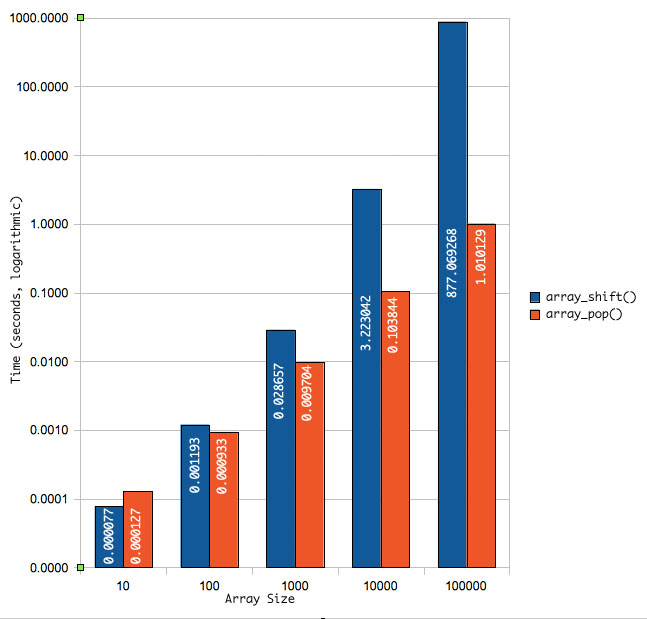
I noticed a note in the PHP documentation about speed differences between array_shift() (pulling the first element off the array) and array_reverse() followed by array_pop() (resulting in the same data, but got to by pulling the last element off the array).

Since I was working on some code to convert URL pieces to program arguments (like turning /admin/users/1/edit into section=admin, module=users, id=1, action=edit – stuff we tend to do every day) I thought I would take a look at the speed differences since I have always used array_shift() for this (after turning the string into an array via explode()).

My initial tests showed that array_shift was much faster than array_reverse followed by array_pop, and I wondered why someone would say that in the first place. But then I thought about it for a bit. When using array_shift the entire remaining array has to be re-indexed every call. For a very short array (like the one I was using) this is negligible. When you start looking at much larger arrays, however, this overhead adds up quickly.

To find out roughly where the break-even point on these two methods lie I whipped up a quick script to run with arrays sized from 10^1 values up to 10^5 values. What I found is that at less than 100 values you are not really gaining much (if anything) by using array_reverse and array_pop versus array_shift. Once you get to the 1000 value array size, however, the differences really add up (as you can see in the logarithmic scaling of the chart below).

shift_vs_pop.jpg

The code I used to generate the numbers (which are shown in the chart as averages over 3 runs, rounded to the nearest millionth of a second) is:

  1. <?php
  2. $counts = array(10,100,1000,10000,100000);
  3. foreach ($counts as $len)
  4. {
  5.         $m2 = $m1 = array();
  6.         $x = 1;
  7.         while ($x <= $len)
  8.         {
  9.                 $m2[] = $m1[] = $x;
  10.                 $x++;
  11.         }
  12.         echo "Timing with array_shift() for $len items\n";
  13.         echo "000000";
  14.         $s1 = microtime(true);
  15.         while (!empty($m1))
  16.         {
  17.                 $tmp = array_shift($m1);
  18.                 if ($tmp % 10 == 0)
  19.                 {
  20.                         echo chr(8),chr(8),chr(8),chr(8),chr(8),chr(8);
  21.                         echo str_pad(.$tmp,6,’0′,STR_PAD_LEFT);
  22.                 }
  23.         }
  24.         $s2 = microtime(true);
  25.         echo "\nTook ",$s2$s1," seconds\n";
  26.        
  27.         echo "Timing with array_reverse and array_pop() for $len items\n";
  28.         $s1 = microtime(true);
  29.         $m2 = array_reverse($m2);
  30.         while (!empty($m2))
  31.         {
  32.                 $tmp = array_pop($m2);
  33.                 if ($tmp % 10 == 0)
  34.                 {
  35.                         echo chr(8),chr(8),chr(8),chr(8),chr(8),chr(8);
  36.                         echo str_pad(.$tmp,6,’0′,STR_PAD_LEFT);
  37.                 }
  38.         }
  39.         $s2 = microtime(true);
  40.         echo "\nTook ",$s2$s1," seconds\n";
  41.         echo "\n";
  42. }
  43. ?>

Post to Twitter Post to Yahoo Buzz Buzz This Post Post to Delicious Delicious Post to Digg Digg This Post Post to Ping.fm Ping This Post Post to Reddit Reddit Post to StumbleUpon Stumble This Post

Error Handling and the PHP @ Operator

June 7th, 2009 by Sjan Evardsson

I have been trying to debug a plugin for WordPress (Shorten2Ping – I will keep plugging this because I think it is so nifty!) and I was running into a problem where the plugin would silently fail with nothing in the logs, no error printing to screen, just dead silence.

I turned on display_errors in php.ini for a while to see if anything would show up. Still nothing. So I started to look through the file again. I knew it was getting as far as creating the short url in bit.ly before it died, but nothing was getting entered into the database. So I started through the make_bitly_url() function and what jumped out and slapped me in the face? $json = @json_decode($response,true); That little, innocuous-looking @ was gulping the error message from a fatal error! (Namely, “Call to undefined function json_decode()“). It turns out that I had PHP compiled with –disable-json, which is default for Gentoo unless you have json in your USE flags.

According to the PHP docs for the Error Control Operator @:

Currently the “@” error-control operator prefix will even disable error reporting for critical errors that will terminate script execution. Among other things, this means that if you use “@” to suppress errors from a certain function and either it isn’t available or has been mistyped, the script will die right there with no indication as to why.

So, if you really must supress error messages, do so, but do so with care. In the case where a suppressed error may be fatal (as in this case) be sure to add documentation to that effect. As in “If this dies a silent death it may very well be that you do not have function xyz() enabled.”

And, note to self, when debugging PHP, the first thing to do is look for and remove the error control operator.

Post to Twitter Post to Yahoo Buzz Buzz This Post Post to Delicious Delicious Post to Digg Digg This Post Post to Ping.fm Ping This Post Post to Reddit Reddit Post to StumbleUpon Stumble This Post

SPDO moving to SourceForge (I hope)

May 27th, 2009 by Sjan Evardsson

While school has kept me busy during my non-work hours I have not had much time to tend to other projects like SPDO. Seeing how my “Abandoned Project Takeover” has been approved on SourceForge, however, has encouraged me to set aside some time to do some house cleaning on the code to get the 1.0b ready to bump to 1.0 stable. According the information they have given me it takes 2 to 3 weeks to fully process an “APT” so I do have a little time (although not a lot). This is not the first time I have tried to do this, but last time it never made it to the approval stage and languished in the queue until it timed out. So, now that it was approved and has been in the queue for 4 business days I am hopeful.

In a lot of ways, moving the project to SourceForge is a lot like making a physical change of residence. It will require updating links, setting up the pages there including wiki, bug tracking, etc, and moving the actual code base over. (Good thing it’s small!)

As always, any suggestions, bugs, or feature requests are welcome, and (for now) should be posted at the page set aside for just that.

Post to Twitter Post to Yahoo Buzz Buzz This Post Post to Delicious Delicious Post to Digg Digg This Post Post to Ping.fm Ping This Post Post to Reddit Reddit Post to StumbleUpon Stumble This Post

SPDO 1.0b Release Candidate 1

March 8th, 2009 by Sjan Evardsson

SPDO version 1.0 beta Release Candidate 1 is out the door. This version adds the following:

Three custom Exception classes: SPDOError, ConnectionFailedError and ForeignKeyViolationError. Which are used (in order) when the program encounters an unknown sql error, a failure to connect to the database, and a violation of a foreign key constraint. Which means, of course, that foreign key constraints are now part of SPDO.

How this was accomplished is through the use of the new DbBuilder class. The DbBuilder class takes a multi-dimensional dict (Python) or array (PHP) of table and field data to build the tables and create triggers in MySQL and SQLite and add foreign keys in PostgreSQL. As an example consider the following:

In Python:

Python [Show Plain Code]:
  1. structure = {
  2.     ‘authors’:{
  3.         ‘id’:[‘primary_auto’],
  4.         ‘first_name’:[‘varchar(50)’],
  5.         ‘last_name’:[‘varchar(50)’, ‘NONULL’, ‘INDEX’]
  6.         },
  7.     ‘books’:{
  8.         ‘id’:[‘primary_auto’],
  9.         ‘author_id’:[‘int’, "FK_CASCADE(‘authors’,'id’)", ‘INDEX’],
  10.         ‘title’:[‘varchar(100)’,‘NONULL’, ‘INDEX’]
  11.         }
  12.     }
  13. dbb = DbBuilder(structure)
  14. dbb.create()

In PHP:

  1. $structure = array(
  2.         ‘authors’=>array(
  3.         ‘id’=>array(‘primary_auto’),
  4.         ‘first_name’=>array(‘varchar(50)’),
  5.         ‘last_name’=>array(‘varchar(50)’, ‘NONULL’, ‘INDEX’)
  6.     ),
  7.     ‘books’=>array(
  8.         ‘id’=>array(‘primary_auto’),
  9.         ‘author_id’=>array(‘int’, "FK_CASCADE(‘authors’,'id’)", ‘INDEX’),
  10.         ‘title’=>array(‘varchar(100)’,‘NONULL’, ‘INDEX’)
  11.     )
  12. );
  13. $dbb = DbBuilder($structure)
  14. $dbb->create()

This results in the following queries to be executed:

In PostgreSQL:

  1. CREATE TABLE authors (
  2.     first_name VARCHAR(50) ,
  3.     last_name VARCHAR(50) NOT NULL,
  4.     id SERIAL PRIMARY KEY
  5.  );
  6. CREATE TABLE books (
  7.     author_id INTEGER ,
  8.     id SERIAL PRIMARY KEY ,
  9.     title VARCHAR(100) NOT NULL
  10. );
  11. CREATE INDEX authors_last_name_idx ON authors(last_name_id);
  12. CREATE INDEX books_author_id_idx ON books(author_id);
  13. CREATE INDEX books_title_idx ON books(title);
  14. ALTER TABLE books ADD FOREIGN KEY (author_id) REFERENCES authors(id) ON DELETE CASCADE;

In MySQL:

  1. CREATE TABLE authors (
  2.     id INTEGER NOT NULL AUTO_INCREMENT PRIMARY KEY,
  3.     first_name VARCHAR(50),
  4.     last_name VARCHAR(50) NOT NULL
  5. );
  6. CREATE TABLE books (
  7.     id INTEGER NOT NULL AUTO_INCREMENT PRIMARY KEY,
  8.     author_id INTEGER NOT NULL,
  9.     title VARCHAR(100) NOT NULL
  10. );
  11. CREATE TABLE fk_error_msg (
  12.     error_msg VARCHAR(100) NOT NULL PRIMARY KEY
  13. );
  14. INSERT INTO fk_error_msg VALUES (‘Foreign Key Constraint Violated!’);
  15. ALTER TABLE authors ADD INDEX(last_name);
  16. ALTER TABLE books ADD INDEX(author_id);
  17. ALTER TABLE books ADD INDEX(title);
  18. CREATE TRIGGER fki_books_author_id
  19.     BEFORE INSERT ON books
  20.     FOR EACH ROW BEGIN
  21.         IF
  22.             0 = (SELECT COUNT(*) FROM authors WHERE id=new.author_id)
  23.         THEN
  24.             INSERT fk_error_msg VALUES (‘Foreign Key Constraint Violated!’);
  25.         END IF;
  26.     END;
  27. CREATE TRIGGER fku_books_author_id
  28.     BEFORE UPDATE ON books
  29.     FOR EACH ROW BEGIN
  30.         IF
  31.             0 = ( SELECT COUNT(*) FROM authors WHERE id = new.author_id )
  32.         THEN
  33.             INSERT INTO fk_error_msg VALUES (‘Foreign Key Constraint Violated!’);
  34.         END IF ;
  35.     END;
  36. CREATE TRIGGER fkdc_books_author_id
  37.     BEFORE DELETE ON authors
  38.     FOR EACH ROW BEGIN
  39.         DELETE FROM books WHERE author_id=old.id;
  40.     END;

In SQLite:

  1. CREATE TABLE authors (
  2.     id INTEGER NOT NULL PRIMARY KEY,
  3.     first_name VARCHAR(50),
  4.     last_name VARCHAR(50) NOT NULL
  5. );
  6. CREATE TABLE books (
  7.     id INTEGER NOT NULL PRIMARY KEY,
  8.     author_id INTEGER NOT NULL,
  9.     title VARCHAR(100) NOT NULL
  10. );
  11. CREATE INDEX authors_last_name_idx ON authors(last_name);
  12. CREATE INDEX books_author_id_idx ON books(author_id);
  13. CREATE INDEX books_title_idx ON books(title);
  14. CREATE TRIGGER fki_books_author_id
  15.     BEFORE INSERT ON [books]
  16.         FOR EACH ROW BEGIN
  17.             SELECT RAISE(ROLLBACK, ‘insert on table "books" violates foreign key constraint "fki_books_author_id"’)
  18.             WHERE NEW.author_id IS NOT NULL AND (SELECT id FROM authors WHERE id = NEW.author_id) IS NULL;
  19.         END;
  20. CREATE TRIGGER fku_books_author_id
  21.     BEFORE UPDATE ON [books]
  22.         FOR EACH ROW BEGIN
  23.             SELECT RAISE(ROLLBACK, ‘update on table "books" violates foreign key constraint "fku_books_author_id"’)
  24.             WHERE NEW.author_id IS NOT NULL AND (SELECT id FROM authors WHERE id = NEW.author_id) IS NULL;
  25.         END;
  26. CREATE TRIGGER fkdc_books_author_id
  27.     BEFORE DELETE ON authors
  28.         FOR EACH ROW BEGIN
  29.             DELETE FROM books WHERE books.author_id = OLD.id;
  30.         END;

Be sure to check out the wiki, and the source code is all readable there, or download and enjoy. There are still a few edits that need to happen in the comments (like versions need to be updated, and changelogs added and there are a few typos probably still lurking about.)

Post to Twitter Post to Yahoo Buzz Buzz This Post Post to Delicious Delicious Post to Digg Digg This Post Post to Ping.fm Ping This Post Post to Reddit Reddit Post to StumbleUpon Stumble This Post

SPDO Wiki and Updates

January 29th, 2009 by Sjan Evardsson

I updated SPDO some today – I added in MySQL support for the Python version, and changed the names of the objects and files to match the new moniker. Speaking of which, I have decided on “Simplified (Python|PHP) Database Object” – so yeah, SPDO is the official name now. (Of course I keep seeing it “speedo”).

I also started a Wiki which will be updated with documentation, samples, etc as I make the time. I am hoping to get a bunch done tomorrow afternoon and this weekend.

The version 0.9 files are spdo-py.tar.bz2 and spdo-php.tar.bz2

Post to Twitter Post to Yahoo Buzz Buzz This Post Post to Delicious Delicious Post to Digg Digg This Post Post to Ping.fm Ping This Post Post to Reddit Reddit Post to StumbleUpon Stumble This Post

New Project: SPDO

January 28th, 2009 by Sjan Evardsson

I have just posted the (embarrassingly empty) page for my new pet project: SPDO (Sjan’s PDO) – in two flavors: PHP and Python.

There are only about a thousand PDOs out there, and perhaps a dozen or so of them are really functional and (in a few cases) very polished pieces of work. So why am I messing with writing my own? A couple of reasons:

  1. I like to have coding signatures that are consistent, whether I am working with PostgreSQL, MySQL or (heaven help us all) SQLite.
  2. I like to have coding signatures that are (reasonably) consistent across different languages – in this case Python and PHP.
  3. I wanted to take advantage of Prepared Statements where I could, even though the PHP implementations of those are pretty weak (especially in the case of MySQL).

Currently implemented in

  • Python:
    • PostgreSQL (with prepared statements)
    • SQLite (no prepared statements).
  • PHP
    • PostgreSQL (with prepared statements)
    • MySQL (with prepared statements)
    • SQLite (no prepared statements)

Here’s an example of how they work (in most simplistic terms):

Python [Show Plain Code]:
  1. #in Python
  2. from pyDB import *
  3. db = pyDB(‘mysite’)
  4. newid = db.insert(‘INSERT INTO test (name, value) VALUES (?,?)’,[‘foo’,‘bar’])
  5. update_count = db.update(‘UPDATE test SET value=? WHERE id=?’,[‘baz’,newid])
  6. results = db.select(‘SELECT * FROM test’)
  7. for row in results:
  8.     for i in row:
  9.         print "\t", i,"\t", row[i]
  10. delete_count = db.delete(‘DELETE FROM test WHERE id=?’,[newid])
  1. //in PHP
  2. require_once(‘phpdb.php’);
  3. $db = new phpDB(‘test’);
  4. $newid = $db->insert(‘INSERT INTO test (name, value) VALUES (?,?)’,array(‘foo’,‘bar’));
  5. $update_count = $db->update(‘UPDATE test SET value=? WHERE id=?’,array(‘baz’,newid));
  6. $results = db->select(‘SELECT * FROM test’);
  7. foreach($results as $row)
  8. {
  9.     foreach ($row as $key=>$val)
  10.     {
  11.         print "\t$key\t$val";
  12.     }
  13. }
  14. $delete_count = $db->delete(‘DELETE FROM test WHERE id=?’,array($newid));

The page with links to the code is in the list up top, and everything is MIT license. Enjoy.

Post to Twitter Post to Yahoo Buzz Buzz This Post Post to Delicious Delicious Post to Digg Digg This Post Post to Ping.fm Ping This Post Post to Reddit Reddit Post to StumbleUpon Stumble This Post

Learning things the hard way

August 28th, 2008 by Sjan Evardsson

These are some things I learned the hard way over the past few weeks. Ignore at your peril!

  • When your setup requires a different database layout (meaning differently named and/or organized databases and/or servers) for development than for live deployment, you would do well to try to mimick the live layout in your development environment before beginning. (This one hurt, bad.) In fact, when you find a need for your application to test for current environment (development vs production), you may want to be extra certain that you really need to set up your development structure that differently.
  • When your test & deployment environment calls for a server external to the existing systems and database servers, make sure that you:
    1. Have a clear understanding of what packages/versions that server will need.
    2. Have a clear understanding of how long it will take to get the hardware in place.
    3. Have a working copy in a VM on the same OS that the server will be deployed on before you say ok to anything.
    4. Ask, beg, plead, whatever, for a copy of that server (even on desktop hardware) to be set up for the testing. If you cannot test against real machines in a real environment for any kind of multi-server deployment, all bets are off. (Um, yeah, again, ouch.)
  • While the occasional 12+ hour day for developers is inevitable, too many of them in a row will result in more mistakes and coding errors of the most simplistic sort.
  • When you discover that you need to add functionality to an integral part of the software (like, say, the primary db connection class) do everything within your power to ensure that it still “works the same” – that is, add any modifications in such a way that they do not break existing code. This is not always easy to tell, but usually a simple trip around the application will tell you quickly if you have broken something as basic as this. (No, I didn’t break it, at least not anywhere other than locally. I actually took this step, many times and saved myself great embarrassment.)
  • Finally, when switching between languages (PHP, Java, Bash, Javascript, etc etc) you may find yourself looking at code that should work, but doesn’t. Chaining calls in PHP seems to be iffy at best. For example:
    • This does not work, although it seems it should. The $db is an instance of a legacy database connection class used for the project, do_query returns an array of results, and do_query with a second argument sets the value of the field named as the key for each row:list($account) = array_keys($db->do_query(“SELECT account_id FROM reports WHERE store_db=’$store’ LIMIT 1″, ‘account_id’));
    • while this does, using the same class and method:$data = $db->do_query(“SELECT account_id FROM reports WHERE store_db=’$store’ LIMIT 1″, ‘account_id’);
      list($account) = array_keys($data);
      // this also works:
      // $account = $data[0]['account_id'];
    • Really, sometimes an extra line is worth not having the headache.

Post to Twitter Post to Yahoo Buzz Buzz This Post Post to Delicious Delicious Post to Digg Digg This Post Post to Ping.fm Ping This Post Post to Reddit Reddit Post to StumbleUpon Stumble This Post

MVCFDH: One way to do MVC in PHP

August 28th, 2008 by Sjan Evardsson

Aaron Saray, over at 102Degrees, put up an interesting article today on MVCFDH, what he calls his way of building MVC architecture in PHP.

The short version is Model-View-Controller (which we are all familiar with) and adding the ‘Front Controller,’ ‘Dataobject’ and ‘Helper’ pieces. I won’t go into details here about what all this means, you can read it over there. The interesting thing is, without really having given it that kind of thought, that is pretty much the way I have always pieced together any kind of MVC work I have done, regardless of the language.

I think there might be a minor difference, though, at least in what we call things. I tend to think of them as ‘Dispatcher’ (don’t jump my case for calling it that, it works in my head!) rather than ‘Front Controller’, ‘Libs’ rather than ‘Helpers’ and ‘Dataobjects?’ I call them ‘Data Objects.’ :P

Post to Twitter Post to Yahoo Buzz Buzz This Post Post to Delicious Delicious Post to Digg Digg This Post Post to Ping.fm Ping This Post Post to Reddit Reddit Post to StumbleUpon Stumble This Post

Using the COM class for PHP backgrounding in Windows

July 2nd, 2008 by Sjan Evardsson

I was having a difficult time finding a reliable way to run a background PHP process in Windows, when that was called from an active PHP page. In the *nix world it is relatively simple: by using shell_exec() (or the bactick operator) you can redirect the output to another stream or file and the process will run in the background with no blocking. In Windows, however, this doesn’t seem to work well (or at all, depending on what you are calling via shell_exec()). I did find the answer, though, from piecing together info from the PHP documentation for shell_exec() and the COM class.

That, with a little trial and error and I was able to get a PHP page to fire off a command-line PHP process to run an import of several years data into a new reporting schema. Since this import relies on some serious data manipulation it has a tendency to time out for large data sets. So, I set up the command line script to run six months worth of data and before it exits it starts a new background process for the next six months of data. In this way I was able to complete a many-hour process without worrying about timeouts. I did notice that running in the background (actually in an “invisible” command shell) that the process ran slower than when running in the foreground. This was acceptable, however, since the page returns immediately while the processing begins and the application is still usable while the process is running.

Here is how I call it from the page:

  1. if(isset($_SERVER[‘PWD’])) { // *nix
  2.     $basepath = dirname(__FILE__).‘/’;
  3.     $php = ‘php’;
  4. } else {
  5.     $basepath = dirname(__FILE__).\\;
  6.     // edit to match your installed target environment
  7.     $php = "C:\\php516\\php.exe";
  8. }
  9. $arg1 = ‘foo’;
  10. $arg2 = ‘bar’;
  11. $runCommand = "$php -q {$basepath}my_background_running.php $arg1 $arg2";
  12. if(isset($_SERVER[‘PWD’])) { // *nix
  13.     // *nix: Use the backtick operator or shell_exec()
  14.     $nullResult = `$runCommand > /dev/null &`;
  15. } else { // Windows: use the php COM class
  16.     // WScript.Shell gives you the command line
  17.     $WshShell = new COM("WScript.Shell");
  18.     $oExec = $WshShell->Run($runCommand, 7, false);
  19. }

I do the same from the background script to call itself recursively right before it exits.

I didn’t find the Microsoft documentation for the Windows Script Host Shell until today during lunch. I found the location in the Practical PHP Programming Online Book where he says to use the Google search “wshell object” msdn which will result in the first link pointing at the MSDN documentation. (I have a feeling it moves around quite a bit, since every link I have run across up to now that points directly at the documentation results in a nice 404 error page at Microsoft.)

Post to Twitter Post to Yahoo Buzz Buzz This Post Post to Delicious Delicious Post to Digg Digg This Post Post to Ping.fm Ping This Post Post to Reddit Reddit Post to StumbleUpon Stumble This Post